MS-010 · Computer Vision
Hand & Face Tracker
Overview
A tracker that watches a webcam and reads your face and hands in real time. It tells whether you look happy, sad, angry or surprised, how far your head is tilted, how long you go between blinks, how many fingers each hand is holding up, and where you are pinching. It can also lock onto an object and follow it as it moves, turns and changes size. Everything shows live in a sidebar next to the video.
I had the idea and steered every change. Claude Code wrote the code and I iterated on it by trying it and saying what felt wrong. The desktop version is written in Python, and a lighter version of it runs below, right in your browser.
Live demo. It runs on your device and nothing is uploaded or recorded.
View the code on GitHub github.com/mtthwsbg/tracker
What it does
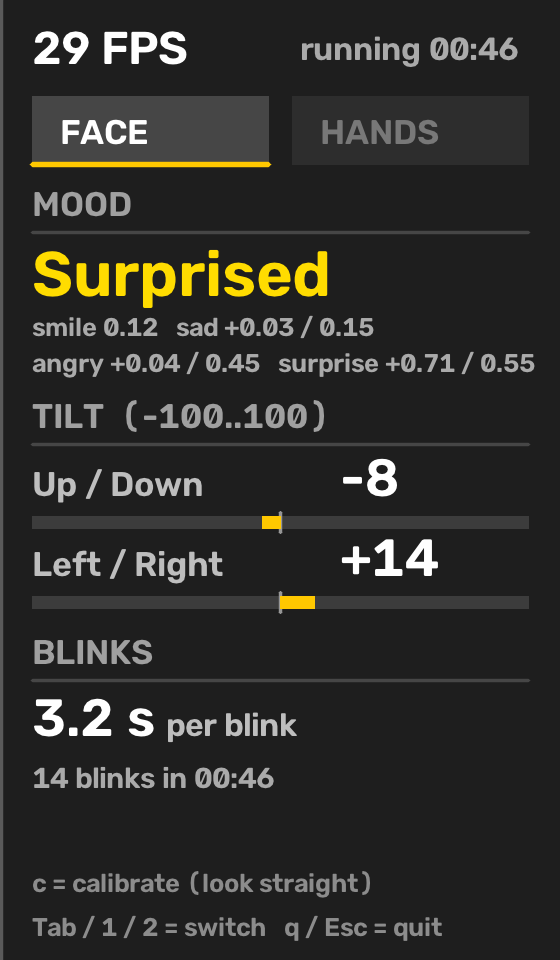
The face side scores a handful of expressions from the camera image and picks the strongest one. It also reads head tilt up and down and left and right on a scale of negative 100 to 100, and it times your blinks, shown as seconds per blink. A one-press calibration learns your neutral face so the numbers mean something for you and not for an average person.
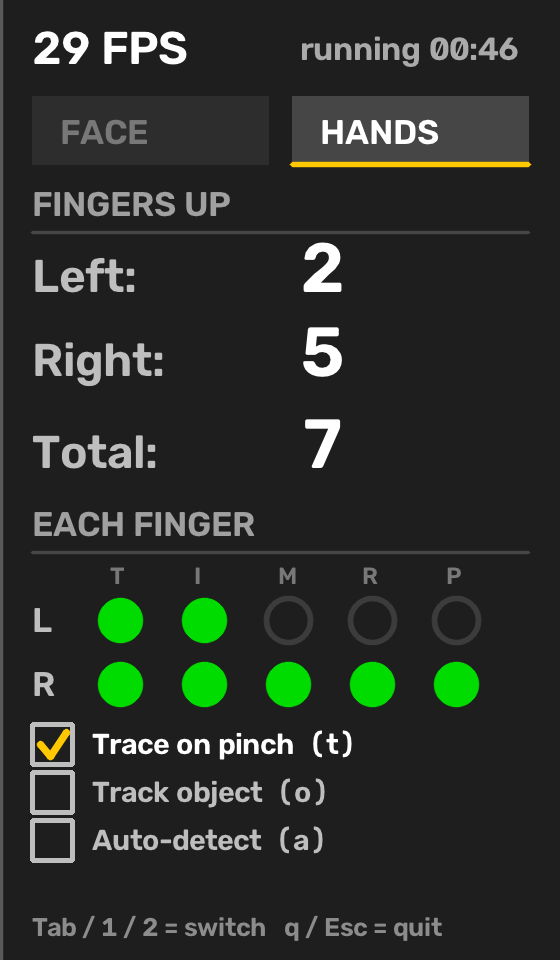
The hand side counts the fingers raised on each hand, shows which finger is up, and draws a trail while you pinch your thumb and index finger together. On the desktop version you can also drag a box around something in your hand, like a phone, and the box will turn and resize as the object does.
What it can be used for
Hands-free control is the obvious one. Counting fingers or drawing with a pinch can drive a slideshow, a game or a simple on-screen input without touching anything. Blink timing is a rough signal for tiredness, which makes the same idea useful for focus and fatigue checks at a desk. Head tilt and mood can steer an interface that reacts to the person using it. It is also a small, readable example of how computer vision turns a video stream into numbers, which makes it a good teaching and prototyping base for human-robot interaction.
How it works
The tracker runs Google's MediaPipe models on every frame. One finds 21 points on each hand and the other finds 478 points on the face plus a set of expression scores for things like smiling, frowning, brow position and how wide the eyes are. Everything the sidebar shows is arithmetic on those points and scores.
Moods come from weighted blends of those expression scores, compared against your calibrated neutral face. Surprise is checked first, then happy, then angry, then sad. Looking up bends the lips into a fake frown, so the tilt reading is used to take that back out. Blinks count when both eyelids close past a threshold and reopen past a lower one, which stops a slow blink from counting twice.
Finger counting measures how straight each finger is by comparing the distance from knuckle to tip with the length of the finger's joints, in three dimensions so tilting the hand does not fake a curl. A hand held edge-on is ignored because its fingers cannot be read reliably. A pinch is the gap between thumb tip and index tip compared with the size of the hand, and it only counts when the hand is reaching out, so a fist does not trigger it.
Object tracking on the desktop version uses three methods in order. It first matches distinctive points on the object from frame to frame, which gives exact rotation and size. If the object has too little detail, like the dark screen of a phone, it falls back to following the object's color against the background and fitting a rotated rectangle to it. If that fails too, a plain box follows the motion. The label on the video says which method is running.
How it grew
It did not start with all of this. Each step came from using the last version and noticing what was missing.
- A first tracker. A hand skeleton, a finger count and a face mood in a sidebar beside the video.
- Calibration and a steadier count. A look-straight calibration, tilt readings, and a rule that ignores hands turned edge-on or resting on the face.
- Tabs and a resizable window. The sidebar split into a face tab and a hands tab, the window became resizable, and the text was redrawn at the display size so it stays sharp.
- More expressions and blink timing. Angry and surprised joined happy and sad, and blinks became seconds per blink with a running total and a program timer.
- Pinch to trace. A fading trail follows the pinch point, and it is off until you turn it on.
- Object tracking. Drag a box around an object to follow it. It first only slid along, so I pushed it to rotate and resize, and added the color and shape fallback after it failed on a dark phone screen.
- Auto-detect. An optional mode that looks for common hand-held items such as a cup, bottle or phone and labels them.
- A browser version. The face and hands tabs rebuilt in JavaScript so the demo above runs with no install.
Limits worth knowing
The speed is set by the camera more than the code. On my laptop the webcam delivered about 10 to 20 frames per second, and the tracking itself needed only a fraction of each frame's time, so a faster camera would help more than faster code. Mood thresholds were set by hand and tested mostly on one face, so they will be off for some people and calibration only partly fixes that. Auto-detect only knows a short list of everyday objects. The browser demo skips object tracking to keep the download small.
Built with Claude Code
This project is a good example of how I work with it. I describe what I want and what felt wrong, Claude Code writes and tests the change, and I try it on my own camera and push back. Most changes in the list above started as one sentence from me after using the last version. You can read more about that setup on my Claude Code page.